

For Businesses
Bringing Your Reviews to Tellacity: A Complete Import Guide
If you're joining Tellacity from another platform, you don't have to start from scratch. Our import tools help you bring your existing reviews over quickly and give your new profile an instant credibility lift.
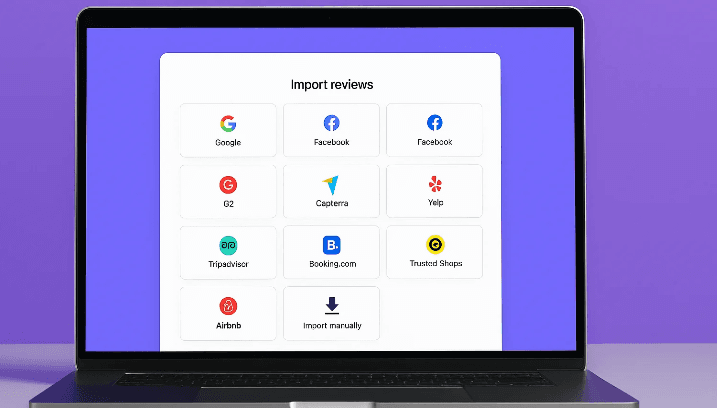
If you're joining Tellacity from another platform, you don't have to start from scratch. The social proof you've worked hard to build is a valuable asset, and our import tools are designed to help you bring it over quickly and easily. Many businesses use Trustpilot or Yelp to collect reviews, alongside sources like Google and Facebook. This guide will show you how to consolidate your reputation, boost your Trust Score, and give your new Tellacity profile an instant credibility lift.
Why Importing Your Reviews Is So Powerful
Before you begin, it's important to understand why importing your reviews is so powerful. A business profile with a rich history of feedback is far more trustworthy than a new, empty one. By importing your existing reviews, you provide potential customers with a comprehensive look at your long-term performance, not just your recent feedback. This historical context demonstrates consistency and reassures customers that you have a proven track record of quality and service.
Two Ways to Import: Direct Integration and CSV
Tellacity offers two primary ways to import your reviews: through direct integration with popular platforms and via a manual CSV upload. Direct integrations are the fastest and most seamless option. From your business dashboard, you can connect your accounts from platforms like Google, Facebook, and many others. Our system will then automatically pull in your existing reviews, including the reviewer's name, rating, text, and date. This method ensures maximum accuracy and minimizes manual work.
For platforms that don't have a direct integration, or if you have reviews stored in a private database, our manual CSV import tool is the perfect solution. We provide a standardized CSV template that you can download from your dashboard. This template ensures that your data is structured correctly for a smooth import. The key is to gather your existing review data and format it to match the columns in our template, a process we'll detail in the following steps.
Step 1: Gather Your Review Data
The first step in a manual import is to gather your review data. You'll need to export your reviews from your current platform or database. Most platforms offer an export feature, though the format may vary. The essential data points you need to collect for each review are: the reviewer's name, the star rating (on a 1–5 scale), the full text of the review, and the original date the review was written. Preserving the original date is crucial for maintaining an accurate timeline of your feedback.
Step 2: Fill the CSV Template
Once you have your review data, open our CSV template using any spreadsheet software like Microsoft Excel, Google Sheets, or Apple Numbers. The template will have clearly labeled columns: reviewer_name, rating, review_text, and review_date. Carefully copy and paste your exported data into the corresponding columns. Pay close attention to formatting, especially for dates, which should ideally be in a standard format like YYYY-MM-DD to ensure they are parsed correctly by our system.
Clean Up Your Data
During the data transfer process, it's a good time to clean up your data. Check for any inconsistencies or errors. For example, ensure all ratings are on a 1–5 scale. If your old system used a different scale (e.g., 1–10), you'll need to normalize it to fit the 1–5 standard. Also, review the text for any strange characters or formatting issues that may have occurred during the export. A few minutes spent on data hygiene can prevent import errors and ensure your reviews look perfect on your Tellacity profile.
Upload Your CSV
After you've filled and saved your CSV file, navigate to the "Get Reviews" section of your Tellacity dashboard and select the "Import Reviews" option. You'll see a choice between direct integrations and the manual upload. Choose the manual option and you'll be prompted to upload your completed CSV file. Our system is designed to handle files with up to several thousand reviews, but for very large imports, we recommend splitting them into smaller batches to ensure a smoother process.
Validation and Preview
Once you upload your file, our system will perform an initial validation check. It will scan for common errors, such as missing required fields, improperly formatted dates, or invalid rating values. If any issues are detected, you'll receive a clear report highlighting which rows need to be fixed. This pre-check step prevents a failed import and allows you to correct any mistakes before the reviews go live.
After a successful validation, you'll be presented with a preview of how your imported reviews will look on your Tellacity profile. This is your final opportunity to review the data and ensure everything appears as expected. You'll see the reviewer names, ratings, text, and dates. Take a moment to scroll through the preview and confirm that the data has been mapped to the correct fields. If everything looks good, you can proceed with the final import.
Confirm Import and Go Live
With a single click on the "Confirm Import" button, your reviews will be added to your Tellacity profile. The process is typically completed within a few minutes, after which your newly imported reviews will be visible to the public and will contribute to your overall Trust Score. All imported reviews will be clearly marked with a label indicating their original source platform, ensuring full transparency for consumers.
Transparency and the "Verified" Badge
Imported reviews are treated with the same integrity as native Tellacity reviews, but they are distinguished by a label that shows their original source (e.g., "Imported from Google"). This is a crucial transparency measure that builds trust with consumers by being upfront about the origin of the feedback. While they contribute to your overall rating and review count, they do not receive a "Verified" badge unless you can provide separate proof of experience for each one.
Trust Score Recalculation
After your import is complete, your Tellacity Trust Score will be recalculated to reflect the newly added reviews. If you've imported a large number of positive reviews, you can expect to see an immediate and significant boost to your score. This is one of the fastest ways to establish a strong, positive reputation on the platform and start attracting new customers right away.
Managing Imported Reviews
Once your reviews are imported, you can manage them just like any other review from your Tellacity dashboard. This includes the ability to write public replies to both positive and negative feedback. Responding to your historical reviews shows that you are an engaged and customer-focused business, further enhancing your profile's credibility.
Can You Import from Any Platform?
A common question is whether you can import reviews from any platform. The answer is yes, as long as you can export the data into a CSV format. Our manual import tool is designed to be platform-agnostic. From major players like Yelp and Tripadvisor to niche industry-specific sites, if you can get the data, you can import it into Tellacity.
Some platforms make it difficult to export review data. If you encounter this issue, there are third-party data scraping services that can help you legally extract your publicly available reviews. However, always ensure that you are complying with the terms of service of the original platform and respecting data privacy regulations. When in doubt, our support team can offer guidance on best practices.
Multi-Location Businesses
If you're a multi-location business, you can perform imports for each of your locations. From your parent dashboard, you can select the specific business profile you want to import reviews for, ensuring that the feedback is attributed to the correct branch. This allows you to build strong, localized reputations for each of your establishments.
Need Help? We're Here
The import process is designed to be user-friendly, but if you run into any trouble, our dedicated support team is here to help. Whether you have questions about formatting your CSV file, dealing with export issues from another platform, or troubleshooting a validation error, we can walk you through the process and ensure your import is successful.
Don't Leave Your Reputation Behind
Don't let your hard-earned reputation get left behind. By using Tellacity's powerful import tools, you can consolidate your social proof, enhance your online presence, and start benefiting from a high-trust, high-visibility profile from day one. It's the fastest way to make your past success work for your future growth.
In Conclusion
Importing your reviews is a simple yet incredibly effective strategy for jump-starting your success on Tellacity. It preserves the valuable reputation you've already built, provides instant credibility to your new profile, and allows you to manage all your customer feedback in one unified place. In just a few minutes, you can transform an empty profile into a rich, trustworthy testament to your business's quality and customer commitment.